
User Roles
In Admin > System Users and Permissions > Create or Edit Role > Apps > Homepage there are various options when configuring the homepage template.
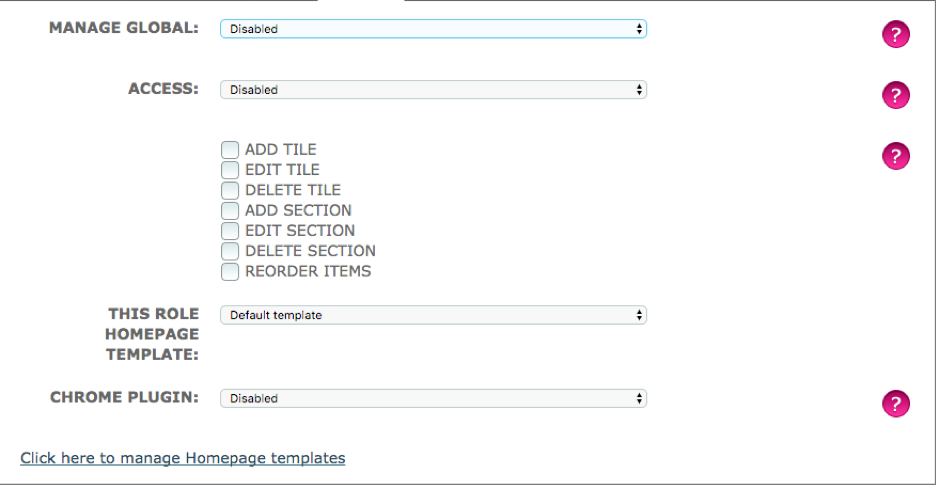
Manage Global
Disabled – The user cannot create, edit or assign homepage templates
May assign homepage globally to a role – This User can assign homepage template to roles they have created.
Access
Disabled – The target will not be able to view the homepage link in the admin section
May view a homepage – Allows a home page template to be viewed by a target
May create and edit a homepage – This allows the target to create and edit existing homepages
Both May view a homepage and May create and edit a homepage control these filters below.
- Add Tile – Target can add new homepage tiles
- Edit Tile – Target can rename or change link to existing homepage tile
- Delete Tile – Target can delete a homepage tile
- Add Section – Target can add a new section to group their tiles
- Edit Section – Target can edit the name of existing sections
- Delete Section – Target can delete a section
- Reorder Item – Target can rearrange the order that the tiles appear in
This Role Homepage Template
A system user can assign a certain homepage template creates to appear for the role that is being edited.
Comments
0 comments
Please sign in to leave a comment.