
In order to use the Message Dashboard you must configure "IMAP backend settings". These are the settings to allow incoming emails.
This is a new section which has been added to the bottom of the Global Settings page.
- Navigate to: Admin > Global Settings > Global Settings
- Scroll to the bottom of the page
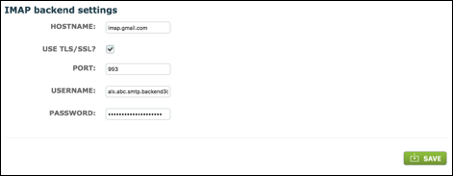
Host Name: Enter the IMAP email provider details.
Use TLS/SSL: This is a type of encryption used by some mail servers. It is recommended as it is the most modern readily available form of traffic encryption. Tick if appropriate.
Port: Enter incoming email port number. Default for TLS/SSL encrypted IMAP is 993.
Username: Enter the mailbox email address.
Password: Enter the password for the mailbox account. This should be the same as used when logging directly into the email account provided.
Click Save.
Please note: The mailbox used here (Username) should be the same as used in the "From" field of "Notification e-mail backend settings" ie the section immediately above.
Comments
0 comments
Please sign in to leave a comment.