
The data and analytics connector (DAC) is available in the Autologyx store.
Once purchased, you will be presented with the connection details to connect to Autologyx data.
To purchase the DAC from the store simply follow the instructions below:
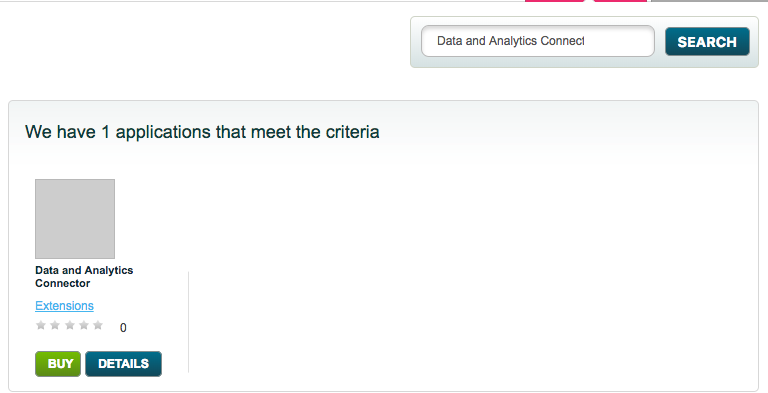
1. Navigate to the store type in 'Data and Analytics Connecter in the search bar. Select this, and when the page loads click Install.
You will be able to connect to the Autologyx Activity History database using the connection details provided.
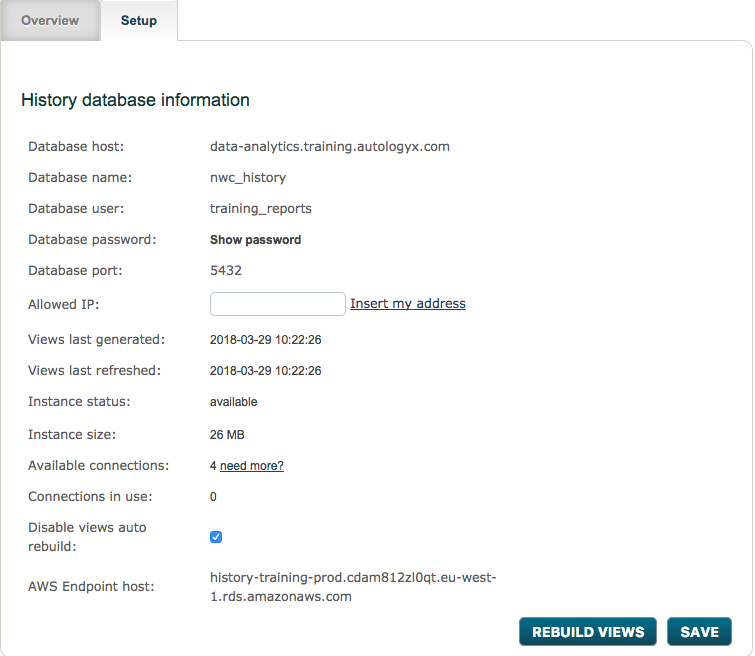
2. The only task you need to do on this DAC page is make sure the correct IP addresses have access to the data. You can find out the IP address of the machine you are using by simply clicking the 'Insert my address' link.
3. The next step is to connect to the data. You can use any reporting tool that supports ODBC, or PGSQL drivers (which is most of them). Popular reporting tools include*:
Excel - good for basic reporting. Possible to execute customer SQL too. Not ideal for distributed reporting though as its inefficient because it will use a connection per spreadsheet.
Microsoft PowerBI - Microsoft's entry level data-analytics tool. Good support for different visualisation, relatively easy to use. Able to push data to central reporting server periodically (up to 8 times per day), requires reporting gateway to do so. No real-time data option however, poor at producing non-tabular reports. Advantage is cost - available as part of Microsoft Office365 suite.
Tableau - Highly functional analytics and data visualisation platform. Support real-time data feeds from Autologyx. Relatively expensive, but very capable.
Now you should be connected to the data and ready to go!
If you have problems connecting the most likely reason will be networking / firewall issues within your business and so your IT department should be the first point of contact.
* PLEASE NOTE We aren't able to support use of these (or other reporting applications) directly and you should refer to your IT/ relevant support contracts with the vendors for help using these products. Also, individual environments vary and we can't promise that these setup instructions they are necessarily right for your every situation, again please refer to your IT/support team for help.
Comments
0 comments
Please sign in to leave a comment.