
This can be found if you go to Admin > Document Template > Create a New Document Template
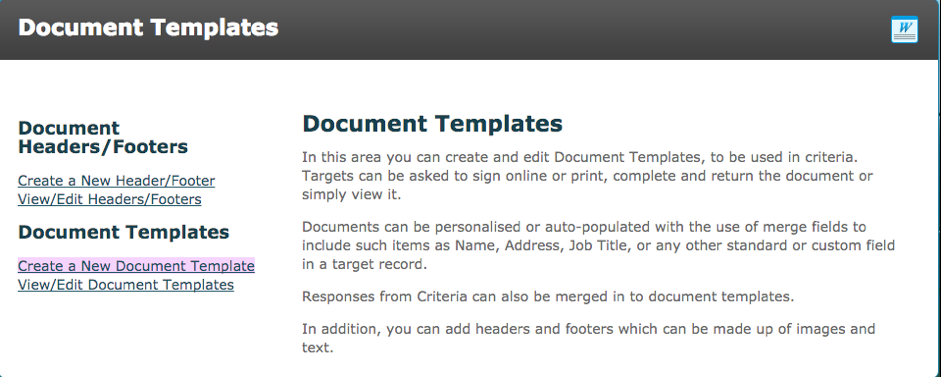
Click on the ‘Create a New Document Template’ which is located under the Document Template Subheading.

The review required option that resides at the top of the webpage, is no longer functional, all interaction and reviews are set in the individual criteria’s for the documents.
The interaction and review option are solely decided in each criteria that contains a document; document generation, document supplier or document store. 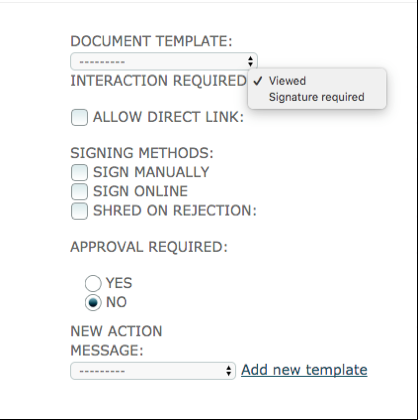
- Allow Direct Link – When the interaction required is set to viewed and the ‘Allow Direct Link’ checkbox is ticked, the system message that is sent to their email address which contain a direct link to the document that the target needs to view.
Signing Methods
This option only appears when the Interaction required is set to signature required.
- Sign manually – The target is required to print sign and re-upload the document
- Sign online – The target can sign online by typing in their name and giving consent
- Shred on rejection – If the criteria is rejected, the document is deleted
NOTE: The options for manually/online sign are defined in Global Settings
Comments
0 comments
Please sign in to leave a comment.