
In Autologyx, there is the ability to view all actions that are completed by the system. This is an inbuilt function that is provided with the system.
Mail collections shows the incoming emails that has been sent using the email collection.
To find Mail Collections go to Admin > Housekeeping > Mail Collections
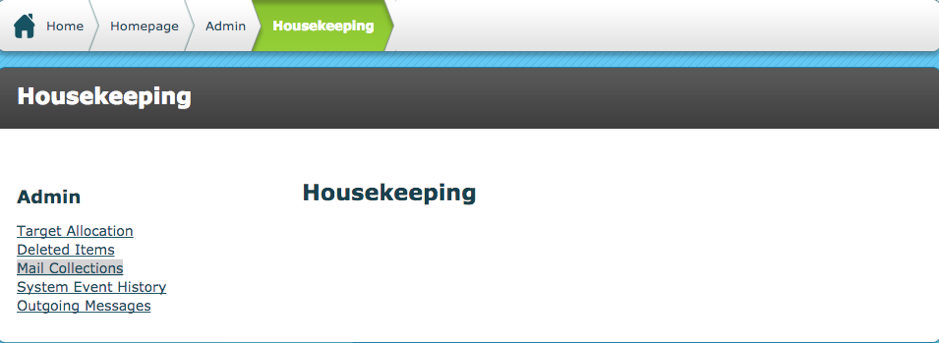
Once opened, the image below is shown.
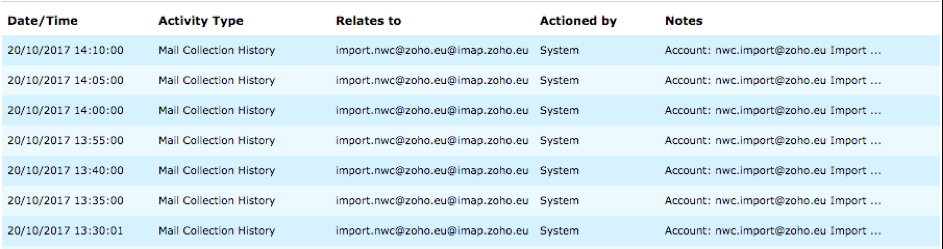
Date / Time – shows the date and time that the system message was sent
Activity Type - states what happened to the item. In this case it will always contain Mail Collection History
Relates To - states which host it relates to in the email collection
Actioned By – states which user sent the email, in this case it will always be the system.
Notes - details the status of the action that has taken place
At the bottom of the page, there are filter options as seen in the image below.
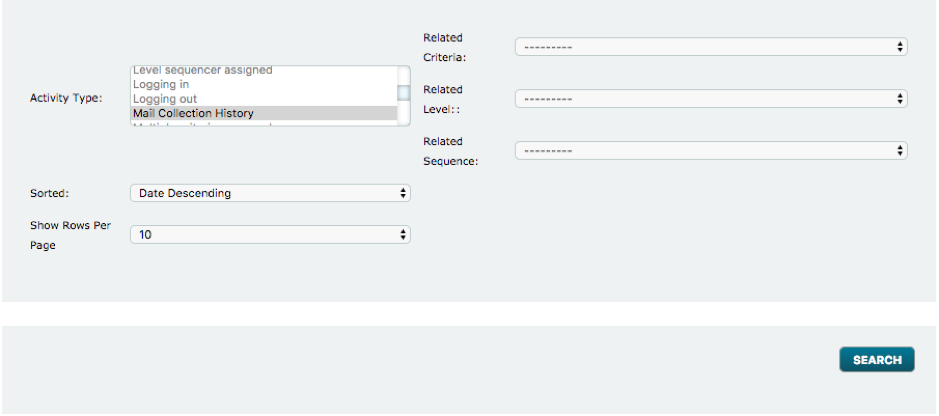
Activity type: User can search according to the activity type. In this case, the only type it can search is ‘Mail Collection History’
Sorted – Can sort the data via date
Show Rows Per Page – Increased/decreasing the rows that appear on the page
Related Criteria - Filter Mail Collection History by the criteria
Related Level – Filter Mail Collection History by the level
Related Sequence – Filter Mail Collection History by sequence it is related to
Click search, after the filters contain what you desire.
Comments
0 comments
Please sign in to leave a comment.