
Summary
This article is to help explain how you can use API calls in your sequence to validate target field responses against other target field responses to give a positive or negative response.
Overview
Where data has been captured manually in the system through a dynamic form submission or target import and this data is required to be checked and validated against static data properties, the system can automate the process to validate this data and give you a positive or negative outcome that can be built into your process and trigger conditional tasks based on the outcome.
Setup example
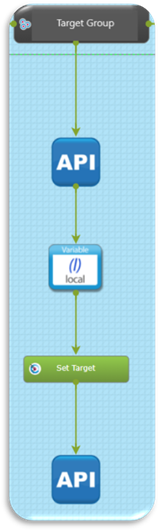 |
In this example we have an API call making a request to a secondary system to look for field data to pull back into the autologyx system. We are using a variable in the process to extract the field data from the JSON object in the API response. This is then passed to a target field in the autologyx system.
A second API call is making a patch request to the target record and analysing the 2 data responses and then validating if these data responses match. The API call then updates a third target field with the outcome of the validation check with a true or false value.
On the example below a validation check using the described configuration looked at the fields ‘Gareth ML Field’ and ‘Gareth ML Test’ with both having a value of $500. The validation check updated the field ‘Gareth1 Test’ with a True response. |

Configuration example
First API call setup:
Data responses can be pushed or pulled into the autologyx system to use this process for validating field data, in this example we have a GET request polling a secondary system to return the required data from the API in the JSON response.
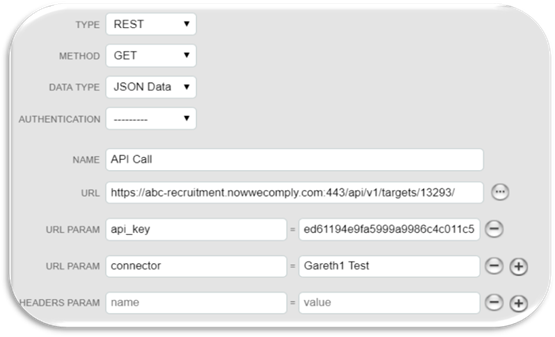
Returned JSON object from API call:
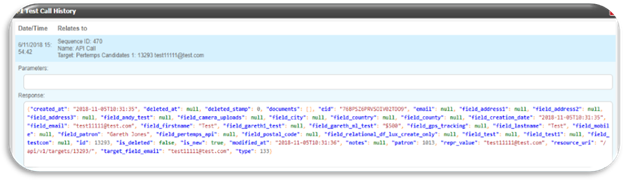
When the API call has been successful it will return the required data as in the example below as a JSON object. Using a variable, you can extract data or sets of data to pull into target fields setup in the autologyx system.
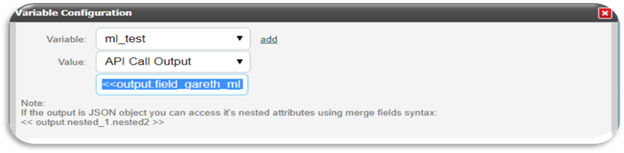
Variable syntax:
When using a local variable to extract data from the JSON response from an API call you need to reference output at the beginning as this always covers the entire object you get as JSON.
You can go deeper into the JSON response:
If the attribute is a list ` [ ]` then you need to use indexes like `.0, .1, .2` to get item from the list.
If it's another dictionary ` {"key": "value”}` then use `key` as an index to obtain `value`.
In this example we need this merge field: << output.field_gareth_ml_test >>
Example using indexes: << output.queryresult.pods.0.subpods.0.plaintext >>
Final Validation API call:
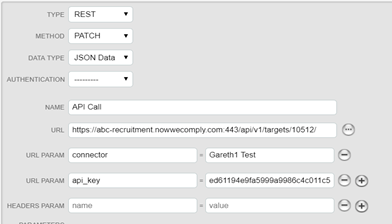
On the final API call you need to make a PATCH request to the target ID of the record you require to validate field data against.
In the parameters of the API call you would be required to have an if statement to do the validate check and then update the required field with a true or false value, example below:
{ "field_gareth1_test": <% if target.field_gareth_ml_test == target.field_gareth_ml_field %>True<% else %>False<% endif %>}
Comments
0 comments
Please sign in to leave a comment.