
Admin > Criteria > Add a New Criteria
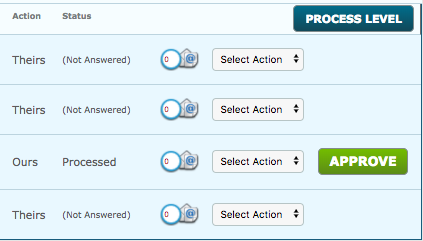
When the Approval Required is set to 'Yes', during the creation of a Criteria, a System User is required to approve the response.This is reflected in the dashboard and on the target's portal.
The status next to the Criteria that requires approval on the Target's profile will change to "Thank you. This item is pending approval" once the criteria has been completed.
When the System User checks the Target's response and approves it, the Criteria will disappear from the Target's Home page and the item will show as "Response approved" in their "Activity and History" tab.
If the System User does not approve the Target's response, its status will remain as pending approval.
The Criteria was a 'Theirs' action, but since there is an approval on the Criteria, the action is now 'Ours'.
When an Approval is required on a Criteria, there is an option to enable Approval with 2 Factor Authentication. If enabled, the User who will approve a Criteria, will have to enter the 2 Factor Authentication code in order to complete the approval. Click here for more information on 2 Factor Authentication.
Comments
0 comments
Please sign in to leave a comment.