
Document Generation v2 is a response type which allows the generation of a document from a template but auto-completes without interaction of any kind from a system user or target.
Documents generated in this way have all the attributes of documents generated by the original Document Generation response type ie full use of merge fields and can be included in document packs, etc.
This document response type has been designed to work with another response type called "Document Signature"
Admin > Criteria > Create a New Criteria
- Create your document template
- Complete the initial fields on the criteria page as normal. The "What Needs To Be Done" and "Notes To Display To Target" fields can be left blank.
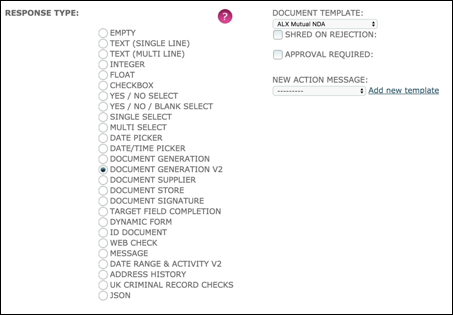
Response Type: select Document Generation v2.
Document Template: Select the required template from the drop down list.
Shred on Rejection: If ticked and the criteria is subsequently rejected or rejected and asked again the document will be permanently deleted.
Approval Required: If ticked, the criteria will require a system user to approve the generated document and the criteria will not auto-complete.
New Action Message: Not relevant.
- Complete the rest of the criteria as required
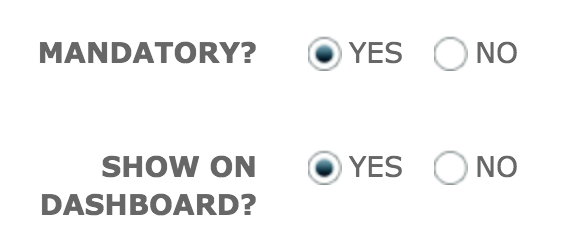
- At the end of the page at the section for Action and Visibility, you'll notice that you have less fields to complete - see below
| Document Generation v2 | Other Response Types |
 |
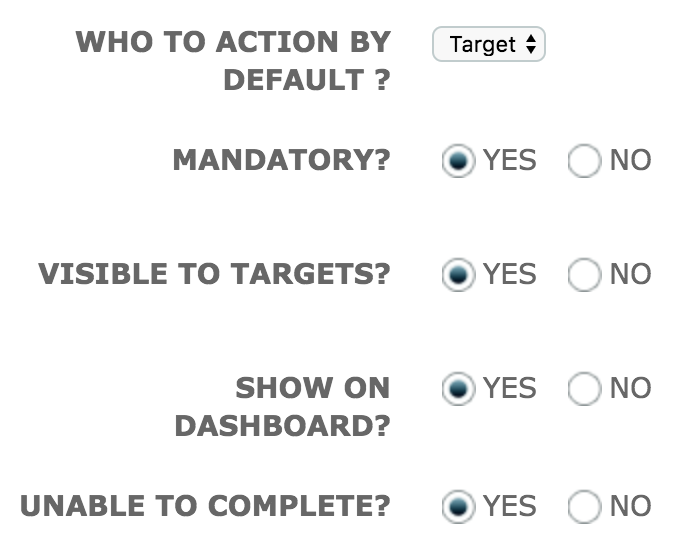 |
Mandatory: Leave defaulted to YES.
Show On Dashboard: It is always useful to track criteria progress on the Dashboard. However, when used in conjunction with criteria response type "Document Signature" you may choose not to see the Document Generation v2 on the Dashboard because once auto-completed, the Document Signature criteria will be immediately assigned.
Save.
Comments
0 comments
Please sign in to leave a comment.