
Admin > Criteria > Add a New Criteria
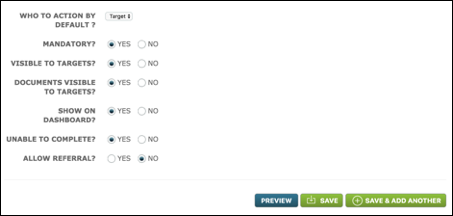
When you create a Criteria, you must specify who is responsible for completing the Criteria, i.e. providing the response to it. This is determined in the "Who to Action by Default" field. Select "Target", as shown below, if the Target is expected to complete the action or "Us" if the action is internal (in other words, a System User is responsible for this part of the process).
The next 6 fields require a simple Yes/No.
Mandatory? - This asks if the criteria's completion is compulsory. More often than not the answer will be Yes.
Visible to Targets? - Here you are asked whether you want this Criteria to be displayed to the Target on their home page. You will usually only answer No if the action is for Us and you don’t want the Target to be aware of the internal part of the process.
Documents Visible to Targets? - If the criteria generates or provides a document or requires that a target or system user upload a document as part of the response, this field will determine whether the document(s) should be available in the target's Document List on their portal. This means that you can have a criteria which requires a system user to upload or sign a document, the task for which is not displayed on the target's portal but the document is in their Document List for review or download.
Show on Dashboard? - Here you are asked whether you want this Criteria to be displayed on the System User's Dashboard. There will be few occasions where you choose not to display the Criteria on the Dashboard, but you might select this option where you are simply providing the Target with information which requires no response and doesn't have an expiry.
Unable to Complete? - Here you are asked whether you want to give the Target the option to say that they are unable to complete the Criteria. If you select Yes, they will be asked to give a reason why and the System User will need to decide whether to approve or reject the response.
Allow Referral? - Here you are asked whether you want an external person to approve the Criteria. This only appears if an approval is required on a Criteria. Selecting Yes, will mean an external person will be contacted within the dashboard to give approval. Click here for more information on referrals.
Comments
0 comments
Please sign in to leave a comment.