
Go to Admin/ Targets/ View/Edit Target Groups
This will take you to the Target Group List.
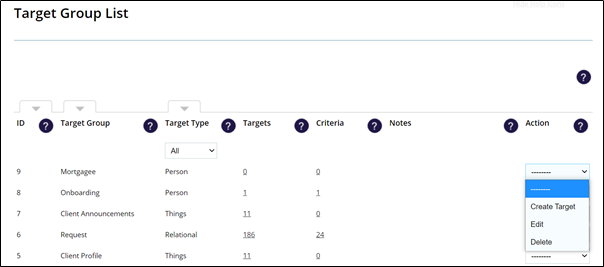
Here you are able to sort Target Groups by ID Number or Name and filter by Target Type. Each Target Group has an Action Menu on the right hand side of the list.
To edit a target group find it in the list and select Edit in its menu.
You will be taken into the Target Group where you will be able to edit the Notes, add further Custom fields and alter the visibility of fields. You will also be able to add further System Roles to the Allocation Groups and change the distribution mechanism if required.
Remember to click Save to keep your changes.
Other menu items against a Target Group are “Delete” and “Create Target”.
Delete – You will not be able to delete a Target Group if it has Target members in it. The Target Records would have to be deleted first.
Create Target – This will take you to the screen where you can manually create a Target Record for the Target Group.
Comments
0 comments
Please sign in to leave a comment.